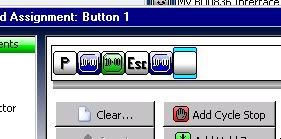
First off please let me express my gratitude for this wonderful program! I'm using version 2011.02.09 in Windows 7 Home Premium 64bit.
This may be a noobish question I don't know.
 I did some due diligence trying to turn up an answer in the forums but came up empty handed.
 OK, I know that I can assign a single controller button to a single key on the keyboard, or a keyboard macro. I'm wondering if there's any way to go the oppisite direction. I'm hoping that I can hold down multiple buttons on my controller and have Xpadder send a single keyboard key (or keyboard macro). Specifically this is what I'm trying to accomplish: I use GameEx as a frontend for my emulator collection. I would like to be able to use my controller (a Rumblepad 2) to exit an emulator and return to GameEx. This is accomplished using the ESC key. Ideally this this action should be assigned in such a way that I don't ever inadvertently exit a game by mistake. That's why I'd like to be able to assign this action to a button combo rather than a single controller button (or a single press and hold button).
tl;dr: I'd like to be able to press and hold R1, R2, L1 and L2 simultaneously on my Rumblepad 2 and assign that combination in Xpadder to the ESC key on the keyboard.
I know I can accomplish this in a secondary scripting app like AutoHotKey, but I'm hoping to keep everything centralized in Xpadder (you know because it's awesome and for simplicity's sake).
Thanks in advance for any advice or instructions you can offer!